Room from a high corner
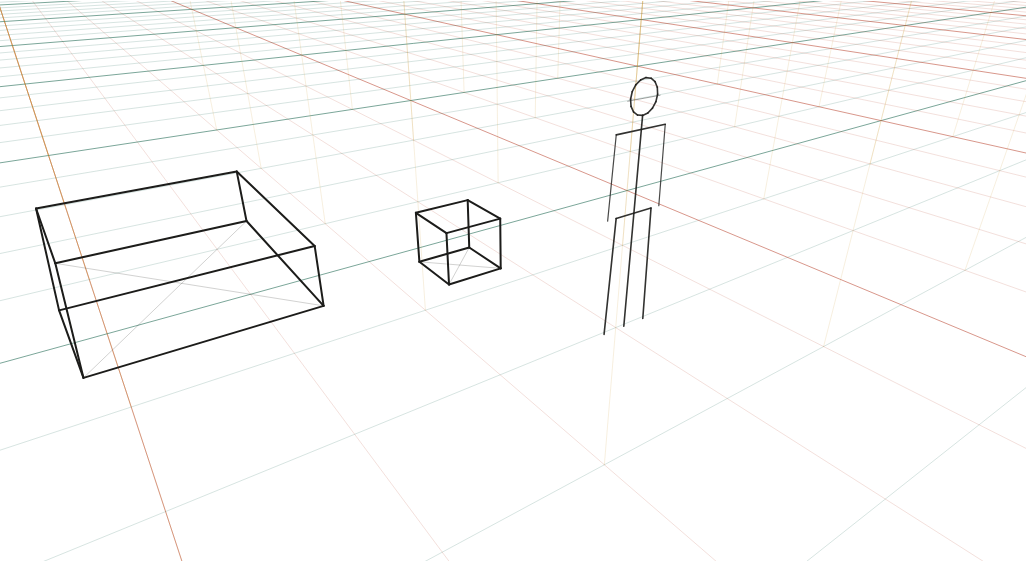
Bed, table, stool and a figure seen from a camera at 2.6 m tilted 28° down: the security-camera view.
What to look at
Looking down adds a third vanishing point below the picture: all verticals lean inward toward it.
The figure's head is now well below the horizon, which is above the top of the frame.
Floor squares show almost their full shape from up here; walls foreshorten instead.
What this scene is for
The security-camera view: a room from a high corner at 2.6 m, tilted 28° down. Useful for interior establishing shots, isometric-feeling game art that still obeys perspective, and any panel where the reader should feel like an observer rather than a participant.
The mistake it settles
Drawing this as an overhead plan with slanted walls. It is a real three-point view: floor squares open up almost to their true shape, walls foreshorten, and the verticals converge downward. The bed and table tops are fully visible, which is exactly what a plan cannot show you.
The camera
| Lens | 24 mm on full frame |
| Camera height | 2.6 m above the floor (elevated) |
| Rotation | 35° to the scene's axes |
| Tilt | 28° down (three vanishing points) |
| Objects | 1.6 × 2 × 0.5 m block · 1.6 × 0.8 × 0.75 m block · 0.5 × 0.5 × 0.45 m block · 1.75 m figure |
| Floor | 1 m squares |
Measured off this render
Taken from the same camera model the tool draws with, on the 1340 × 754 PNG above.
| Angle of view | 73.7° across (24 mm on full frame) |
| Horizon | 98 px above the top edge — outside the picture |
| Depth-axis vanishing point | 38 px beyond the left edge |
| Width-axis vanishing point | 775 px beyond the right edge |
| Vertical point | Nadir 1,303 px below the picture |
| Object | Distance | Height on the render | Below the horizon |
|---|---|---|---|
| 1.75 m figure | 4.3 m | 325 px | all of it |
| 0.5 × 0.5 × 0.45 m block | 5.2 m | 64 px | all of it |
| 1.6 × 2 × 0.5 m block | 5.5 m | 75 px | all of it |
| 1.6 × 0.8 × 0.75 m block | 6.7 m | 120 px | all of it |
Draw it from these numbers
- The horizon is off the top of the picture, 98 px above the edge. Mark it on a larger sheet, or work from the grid: it is why every roof and every head is below you.
- Two vanishing points on that line: 38 px beyond the left edge, and 775 px beyond the right edge — close enough to reach on a larger sheet.
- Nothing here is truly vertical: the uprights lean to a nadir 1,303 px below the picture.
- Set the scale from the 1.75 m figure at 4.3 m, 325 px tall on the render; the horizon passes above it, so it is shorter than the 2.6 m camera.
Open the reference in the tool to move the camera, change the lens, or add your own objects at real sizes; the share link keeps your version. Draw over the PNG at 30–50% opacity in any app with layers.
Question
How much does a 28° downward tilt lean the verticals?
Enough to see but not enough to shout: in this render the nadir sits about 1,300 px below the bottom edge, so the verticals converge gently. A 45° tilt would bring it much closer and the lean would dominate the picture. Small tilts are what make an interior feel observed rather than dramatic.