Crowd, standing camera
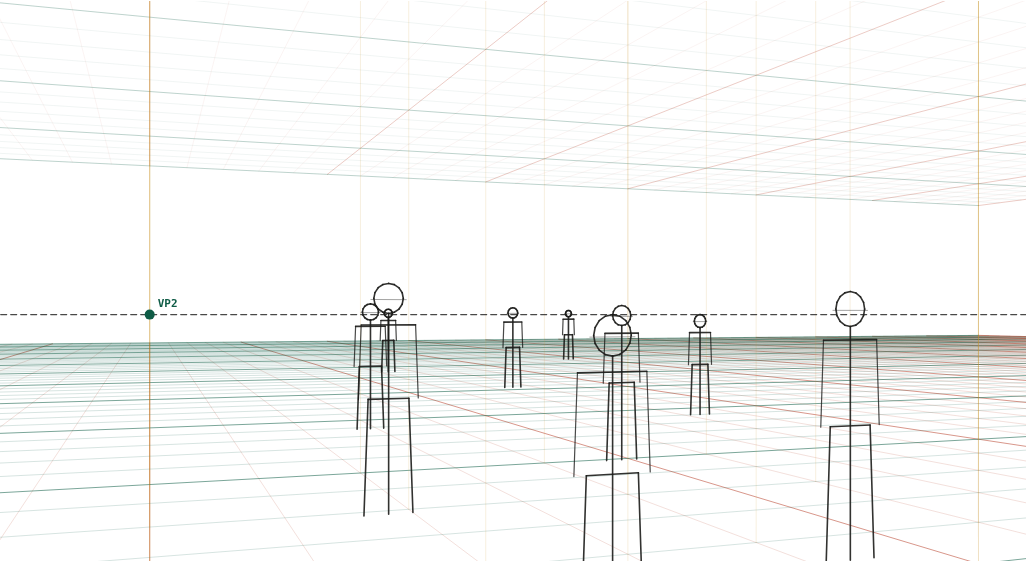
Ten figures of 1.6–1.85 m scattered from 4 to 36 m, camera at 1.6 m.
What to look at
Heads cluster on the horizon; only the taller and shorter people rise above or dip below it.
The floor squares place each figure at a definite distance, which is what keeps a crowd from floating.
Overlap does more for depth here than convergence; let near figures cover far ones.
What this scene is for
Ten figures between 1.6 and 1.85 m scattered from 4 to 36 m. Use it when a scene needs a crowd rather than a queue: concert audiences, markets, stations, protests, any panel where people fill the space at different depths.
The mistake it settles
Making the crowd out of one figure at several sizes. Real crowds vary in height by 25 cm or so, and it is the variation around the horizon — a few heads above it, a few below — that stops a crowd looking like stamped copies. Overlap does the rest: let near figures cover the far ones.
The camera
| Lens | 35 mm on full frame |
| Camera height | 1.6 m above the floor (standing) |
| Rotation | 20° to the scene's axes |
| Tilt | level (verticals stay vertical) |
| Objects | 6 × 1.75 m figure · 2 × 1.6 m figure · 1.85 m figure · 1.7 m figure |
| Floor | 1 m squares |
Measured off this render
Taken from the same camera model the tool draws with, on the 1340 × 754 PNG above.
| Angle of view | 54.4° across (35 mm on full frame) |
| Horizon | 422 px from the top, 56% of the image height |
| Depth-axis vanishing point | 196 px from the left edge |
| Width-axis vanishing point | 2,909 px beyond the right edge |
| Object | Distance | Height on the render | Below the horizon |
|---|---|---|---|
| 1.75 m figure | 4.7 m | 570 px | 91% |
| 1.6 m figure | 5 m | 417 px | all of it |
| 1.75 m figure | 6.9 m | 351 px | 91% |
| 1.85 m figure | 8.1 m | 301 px | 86% |
| 1.7 m figure | 11.1 m | 201 px | 94% |
Draw it from these numbers
- Rule the horizon across the sheet at 56% of the picture height — 422 px down on this 754 px render. Every other line in the scene is measured from it.
- Two vanishing points on that line: 196 px from the left edge, and 2,909 px beyond the right edge — far enough out that you should match the grid angles instead of chasing it.
- Set the scale from the 1.75 m figure at 4.7 m: 570 px tall, with 91% of it below the horizon. That share is the camera height divided by the object's height (1.6 ÷ 1.75 m), and it is the same for every object of that height anywhere in the picture.
Open the reference in the tool to move the camera, change the lens, or add your own objects at real sizes; the share link keeps your version. Draw over the PNG at 30–50% opacity in any app with layers.
Question
How do I keep a crowd from looking like a wall of cut-outs?
Three things: vary the heights by 10–20 cm so the heads scatter slightly around the horizon, place the feet on definite floor squares so each figure is at a stated distance, and overlap generously. Convergence alone will not sell depth in a crowd; occlusion will.