City from a rooftop
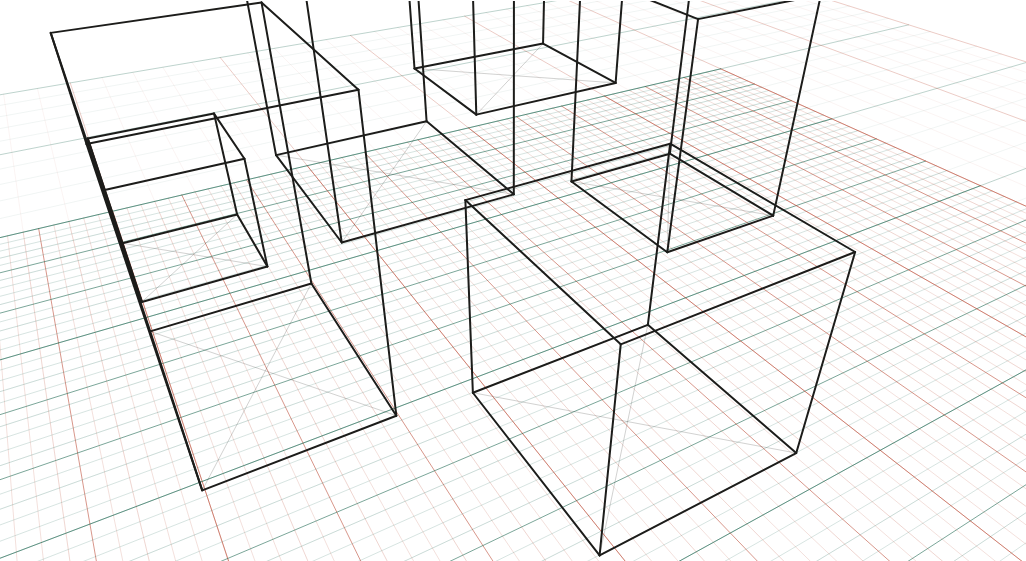
Five blocks seen from 40 m up, tilted 35° down: the bird's-eye view.
What to look at
Verticals converge downward to a nadir below the picture.
The horizon is off the top of the frame entirely, 353 px above it on the render: every roof is visible because everything is below eye level.
Streets between the blocks read as the ground grid, foreshortened toward the horizon.
What this scene is for
Five blocks from 40 m up, tilted 35° down: the drone shot, the establishing panel, the map-like game view that still has real perspective in it. Use it for city overviews and for any scene where the viewer is meant to be above the action rather than in it.
The mistake it settles
Putting the horizon inside the frame. From 40 m up with a 35° tilt the horizon is off the top of the picture entirely — about 350 px above the edge in this render — and every roof is visible because everything is below eye level. Drawing a visible horizon line in a bird's-eye view is the fastest way to lose the height you were trying to show.
The camera
| Lens | 28 mm on full frame |
| Camera height | 40 m above the floor (elevated) |
| Rotation | 30° to the scene's axes |
| Tilt | 35° down (three vanishing points) |
| Objects | 10 × 14 × 18 m block · 12 m cube · 14 × 16 × 24 m block · 10 × 12 × 16 m block · 16 × 14 × 30 m block · 8 m cube |
| Floor | 1 m squares |
Measured off this render
Taken from the same camera model the tool draws with, on the 1340 × 754 PNG above.
| Angle of view | 65.5° across (28 mm on full frame) |
| Horizon | 353 px above the top edge — outside the picture |
| Depth-axis vanishing point | 65 px beyond the left edge |
| Width-axis vanishing point | 1,534 px beyond the right edge |
| Vertical point | Nadir 1,111 px below the picture |
| Object | Distance | Height on the render | Below the horizon |
|---|---|---|---|
| 12 m cube | 30.6 m | 194 px | all of it |
| 10 × 14 × 18 m block | 36.8 m | 310 px | all of it |
| 8 m cube | 51 m | 113 px | all of it |
| 10 × 12 × 16 m block | 55.3 m | 231 px | all of it |
| 14 × 16 × 24 m block | 58.9 m | 363 px | all of it |
Draw it from these numbers
- The horizon is off the top of the picture, 353 px above the edge. Mark it on a larger sheet, or work from the grid: it is why every roof and every head is below you.
- Two vanishing points on that line: 65 px beyond the left edge, and 1,534 px beyond the right edge — far enough out that you should match the grid angles instead of chasing it.
- Nothing here is truly vertical: the uprights lean to a nadir 1,111 px below the picture.
- Set the scale from the 12 m cube at 30.6 m, 194 px tall on the render; the horizon passes above it, so it is shorter than the 40 m camera.
Open the reference in the tool to move the camera, change the lens, or add your own objects at real sizes; the share link keeps your version. Draw over the PNG at 30–50% opacity in any app with layers.
Question
How high does the camera have to be before the horizon leaves the frame?
It is the tilt that decides, not the height. Tilt down far enough and the horizon slides off the top whatever your altitude; here 35° is already enough. Height changes how much you look down on the roofs, which is why a 12 m rooftop and a 40 m one look different even at the same tilt.