Room in six-point, 360°
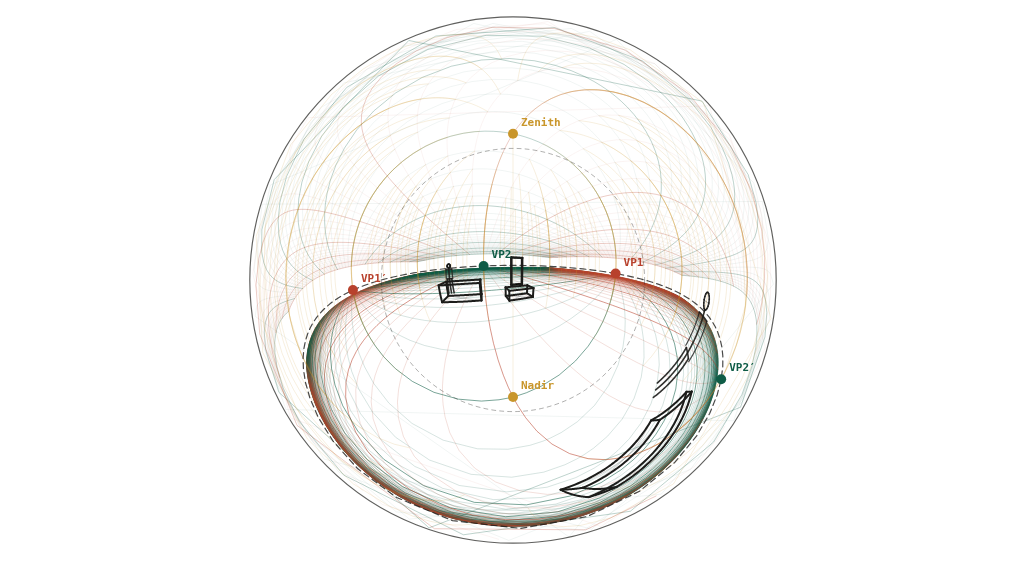
The fisheye room continued round to 360°: a table and a figure behind the camera appear near the rim.
What to look at
Inside the dashed 90° ring is the fisheye view; outside it is what is behind you, reversed.
The rim is the single point directly behind the camera.
Objects behind you are small and bent; they make the picture read as a whole sphere.
What this scene is for
The fisheye room continued all the way round to 360°, so the table and the figure behind the camera appear near the rim. Use it for 360° panoramas, VR authoring, and as a thinking tool: it is the only view in the library that shows the whole sphere around the viewer.
The mistake it settles
Reading the outer ring as more of the same room. Everything outside the dashed 90° ring is behind you and reversed, and it compresses hard toward the rim, which is the single point directly at your back. Objects there are small, bent and mirrored on purpose.
The camera
| Lens | 360° angle of view (curvilinear) |
| Camera height | 1.5 m above the floor (standing) |
| Rotation | square to the scene (one-point) |
| Tilt | level (verticals stay vertical) |
| Objects | 2 × 0.9 × 0.8 m block · 1.2 × 0.6 × 0.45 m block · 2.1 m door · 2 × 1.75 m figure · 1.6 × 0.8 × 0.75 m block |
| Floor | 1 m squares |
Measured off this render
Taken from the same camera model the tool draws with, on the 1340 × 754 PNG above.
| Angle of view | 360° across (curvilinear) |
| Horizon | 377 px from the top, 50% of the image height |
| Image circle | radius 354 px, 0.51° per pixel |
| 90° ring | 177 px from the centre |
| Object | Distance | Off the centre of view | Height |
|---|---|---|---|
| 1.75 m figure | 3.4 m | 145° | 1.75 m |
| 1.2 × 0.6 × 0.45 m block | 3.8 m | 32° | 0.45 m |
| 1.6 × 0.8 × 0.75 m block | 4 m | 159° | 0.75 m |
| 2 × 0.9 × 0.8 m block | 4.2 m | 26° | 0.8 m |
| 1.75 m figure | 5.5 m | 28° | 1.75 m |
Draw it from these numbers
- Draw the image circle first: on this render it has a radius of 354 px, which works out at 0.51° of the world per pixel.
- Mark the 90° ring at 177 px from the centre: inside it is what is in front of you, outside it is what is behind you, reversed.
- The horizon crosses the centre line 50% of the way down and bows away from there; only a line through the exact centre of view stays straight.
- Scale check: the 1.75 m figure at 3.4 m sits 145° off the centre of view, so it lands 284 px out from the middle.
Open the reference in the tool to move the camera, change the lens, or add your own objects at real sizes; the share link keeps your version. Draw over the PNG at 30–50% opacity in any app with layers.
Question
What is six-point perspective?
Five-point plus the sixth point behind the viewer, which is the rim of this picture. It maps the complete sphere of vision onto one circle, at about 0.51° per pixel here, and it is the projection behind 360° photographs and VR environments rather than something anyone draws freehand.