Street in five-point
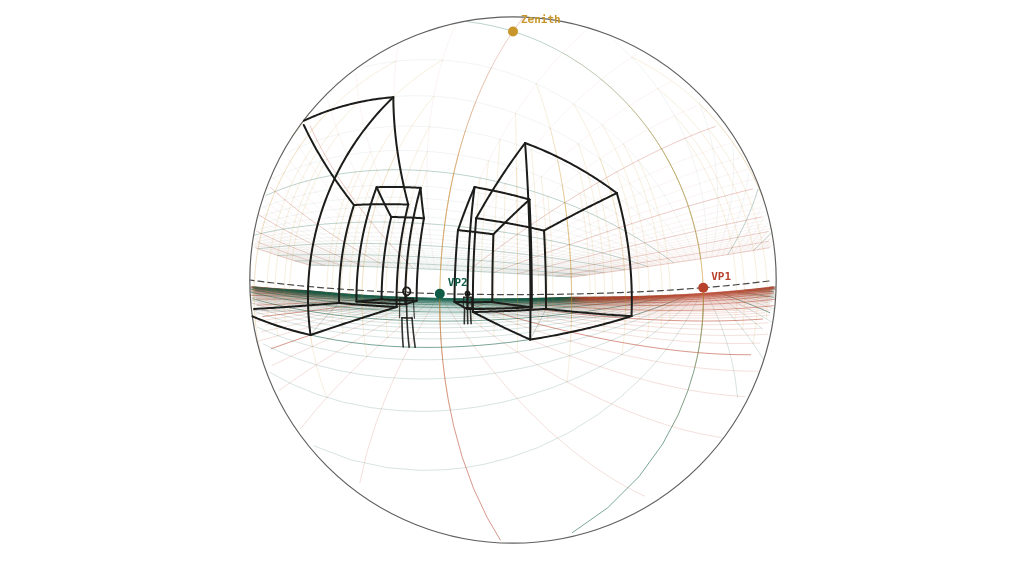
The two-point street reference redrawn in five-point: buildings bow, the sky is a circle.
What to look at
Verticals curve toward zenith and nadir on the rim; the horizon curves because the camera is tilted 5° up.
The buildings' tops converge to the zenith even though the camera is barely tilted: curvilinear always shows both.
Open the two-point street reference beside it for the flat version.
What this scene is for
The two-point street reference redrawn as a five-point curvilinear view. Open both side by side: same buildings, same figures, same camera, two projections. It is the clearest way to understand what curvilinear perspective actually changes.
The mistake it settles
Treating five-point as a stylistic filter. The curvature follows the same camera: the horizon bows because the camera is tilted 5° up, and the buildings bend toward the zenith and nadir at the same time. Curving lines by feel gives a fish-eye look without the internal consistency that makes it convincing.
The camera
| Lens | 180° angle of view (curvilinear) |
| Camera height | 1.6 m above the floor (standing) |
| Rotation | 25° to the scene's axes |
| Tilt | 5° up (three vanishing points) |
| Objects | 8 × 14 × 12 m block · 8 × 10 × 9 m block · 8 × 12 × 18 m block · 8 × 16 × 15 m block · 2 × 1.75 m figure |
| Floor | 1 m squares |
Measured off this render
Taken from the same camera model the tool draws with, on the 1340 × 754 PNG above.
| Angle of view | 180° across (curvilinear) |
| Horizon | 397 px from the top, 53% of the image height |
| Image circle | radius 354 px, 0.25° per pixel |
| 90° ring | 354 px from the centre |
| Object | Distance | Off the centre of view | Height |
|---|---|---|---|
| 1.75 m figure | 5.1 m | 42° | 1.75 m |
| 1.75 m figure | 9.1 m | 22° | 1.75 m |
| 8 × 10 × 9 m block | 12.2 m | 16° | 9 m |
| 8 × 14 × 12 m block | 15 m | 63° | 12 m |
| 8 × 16 × 15 m block | 26.9 m | 13° | 15 m |
Draw it from these numbers
- Draw the image circle first: on this render it has a radius of 354 px, which works out at 0.25° of the world per pixel.
- The rim itself is the 90° ring, so everything in front of the camera lands inside the circle and nothing behind it appears at all.
- The horizon crosses the centre line 53% of the way down and bows away from there; only a line through the exact centre of view stays straight.
- Scale check: the 1.75 m figure at 5.1 m sits 42° off the centre of view, so it lands 168 px out from the middle.
Open the reference in the tool to move the camera, change the lens, or add your own objects at real sizes; the share link keeps your version. Draw over the PNG at 30–50% opacity in any app with layers.
Question
What are the five points in five-point perspective?
Four around the rim — up, down, left, right — plus the point at the centre of view. In this render the rim is the 90° ring, 354 px from the centre, and everything you can see in front of you lands inside it.